Early access is open · Pay once, own it · Runs on your own NCA Toolkit Get on the list

Organized and clipped automatically

Your content, social media ready.

Pick a ready-made automation and switch it on. From then on, every new recording is filed, transcribed, cut and captioned by itself, on a server you own, with no AI tokens spent on each video.

A new upload starts the run. Each step lights up as it finishes, with nobody at the desk.

Shown to creators and media teams at

  • Claude Code Creators Summit
  • Tech Week Los Angeles
  • The KINN

Made for every feed you post to

  • TikTok
  • Instagram
  • YouTube
  • Facebook
  • LinkedIn
  • X
  • Twitch
  • Spotify
  • Apple Podcasts

One recording in. A clip for every feed out.

  1. Filed and transcribed
  2. Cut at the pauses
  3. Reshaped and captioned
  4. Approved in Review
  5. Ready for every feed

A real interview from LA Tech Week is filed, transcribed and cut at the pauses into five clips. Each one is reshaped and captioned with its own words: Its own shape for LinkedIn, Vertical 9:16 for TikTok, Portrait 4:5 for Instagram feed, Vertical 9:16 for YouTube Shorts, Vertical 9:16 for Facebook Reels. Someone approves them in Review, and they are ready for every feed. Anyone finishing by hand gets the cuts as a timeline for Premiere Pro, DaVinci Resolve, Final Cut Pro, or as a numbered clip pack with captions for CapCut. No AI tokens are spent on these clips, and the next recording runs the same way.

Pick

Start from a ready-made automation

Pick one for clips, captions, transcripts or audio and switch it on. It runs on every new upload with plain editing steps, so no AI tokens are spent on each video. Every step sits on a canvas you can read and change.

  • Ready-made automations for clips, captions, transcripts and audio
  • Steps connect themselves, so there is nothing to wire up
  • Need something else? Describe it and the agent builds it once
Runs by itself

Every new recording runs by itself

Once it is on, an automation starts on its own when a file is uploaded, lands in a watched folder, a schedule comes round or another tool calls it. Plain editing steps do the work, so nothing is billed per video.

  • Starts from an upload, a folder, a schedule or a webhook
  • Watch each step finish, or come back to a list of what happened
  • Comes with its own automation builder, made for content
  • Prefer an outside platform? n8n is available
Approve

Nothing goes out until someone says yes

Add an approval step anywhere. The run pauses, the right people get an alert, and they watch the clip, leave a comment pinned to the exact moment and approve it or ask for changes.

  • Choose who can approve each step
  • Comments pinned to a moment in the clip
  • Decide what happens if nobody answers in time
Finish

Finish it in the editor you already use

The repeatable work happens automatically. Anything that still needs a human opens in your editing app with every cut adjustable, or goes to your editor already trimmed, captioned and labelled.

  • Timelines for Premiere Pro, DaVinci Resolve and Final Cut Pro
  • CapCut-ready clip packs
  • Caption files and the finished clips in one download
  • Premiere Pro
  • DaVinci Resolve
  • Final Cut Pro
  • CapCut

And the parts you would otherwise do by hand

Your brand, set once

Logo, colour, font and music are saved in settings and used by every step that needs them. No step ever asks again.

Organized in your own storage

Every upload and every output is filed in your bucket, with its length, picture size and the run that made it.

Retries, then an alert

If the toolkit is busy or offline, the step waits and tries again. If it still fails you get an alert saying what went wrong.

On a schedule, in your time zone

Run it every morning or every Friday at 9. The canvas shows what starts it and when it last ran.

Meeting recordings come in by themselves

Connect Zoom, Google Meet or Microsoft Teams once. When a recorded meeting ends, its video lands in Uploads and starts whatever automation is set to run on an upload. An owner can connect a whole Zoom account, and past recordings can be brought in by hand.

  • Zoom
  • Google Meet
  • Microsoft Teams

Find any moment by what was said

The library holds every upload and everything your automations made. Files are transcribed once on your own toolkit, so you can search the words, jump to the moment, and tag, star and sort what you keep.

Plan what goes out on a calendar

See what posts when, what is due and when your automations run, by month or week. Set repeating slots like Mondays at 10 on Instagram, queue posts into them and drag anything to another day.

Best moments and chapters

One step writes chapters and show notes you can paste into a YouTube description. Another picks the strongest moments as clips, each starting and ending on whole words. Picking uses AI once per video; the cutting is plain editing.

Vertical clips that follow the speaker

Turn a wide recording into a tall one that keeps whoever is talking in frame, moving gently when they move and switching when someone else speaks.

Use it from the AI apps you already use

The dashboard is an MCP server. Connect any MCP client to see your uploads and runs, build automations as drafts for you to publish, and start runs, signed in as you on the team you pick.

  • Claude
  • ChatGPT
  • Cursor
  • n8n

Also in the dashboard

Drop in your first video, get early access sooner

Sign up and the real toolkit cuts your video at the pauses into vertical clips with captions, ready to download. Everyone who tries it moves to the front of the early-access list.

Drop a video here

Up to 10 minutes and 1 GB.

  1. Uploaded
  2. Read by the toolkit
  3. Cut at the pauses, made vertical
  4. Captioned
  5. Ready to download
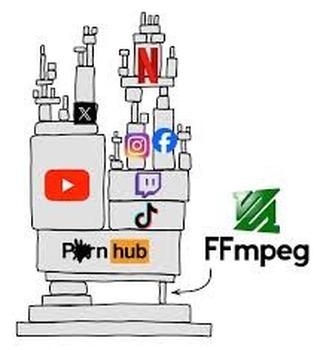
Cartoon tower of platform logos, YouTube, Netflix, X, Instagram, Facebook, Twitch, TikTok and Pornhub, all resting on one small block labelled FFmpeg

Five ways to use the free engine

  1. The engine alone

    Send requests to the toolkit's API from your own scripts.

    Leaves youEvery new job is new code, and every failure is yours to catch.

  2. An AI agent on your computer

    Ask Claude Code or another agent to edit each video through the toolkit or FFmpeg.

    Leaves youSitting with it every time, using up your plan's limits or API credits, laptop open.

  3. n8n with the engine

    It comes with the toolkit, though many people never set it up.

    Leaves youWiring each request and typing expressions by hand, with no library, review or brand settings.

  4. social-clips, our free version

    Clone it and run it yourself for one job: turning videos into social clips.

    Leaves youJust that one job, without the builder, imports, teams, approvals or the agent.

  5. Takewon, the fine-tuned shell

    Switch on ready-made automations, or describe a new one and the agent sets it up.

    What happensRecordings come in, get processed, wait for your yes and land organized, on brand, with no AI used per video.

One clip, the right shape everywhere

TikTok clips come out Vertical 9:16, up to 3 min each.

Formats it knows Short videos, carousels, Stories

TikTok itself takes: Every account can post 3 min; some can post 5 or 10 min.

In your brand, every time

  • Caption style
  • Logo
  • Colours
  • Font

Set once in Settings. Every clip picks them up by itself.

Checked on 18 Nov 2026 against TikTok’s own specs.

Hit record. The clips make themselves.

Drop in one long video and walk away. It is filed, transcribed and cut into captioned clips shaped for every feed, with no per-minute fees. The ones that need your touch open straight in your editor.

Without TakewonAn hour each upload in an editor or an AI chat, or a clipping app billing you by the minute.

InOne long video

  • Captioned vertical clips
  • Square cut for the feed
  • Thumbnail
  • Searchable transcript

The usual stack Billed every month

  • January

    • Transcriptsper minute
    • AI clippingper upload minute
    • Captions and rendersper credit
    • Scheduling toolper month
    • Extra editorsper seat
  • February

    • Transcriptsper minute
    • AI clippingper upload minute
    • Captions and rendersper credit
    • Scheduling toolper month
    • Extra editorsper seat
  • March

    • Transcriptsper minute
    • AI clippingper upload minute
    • Captions and rendersper credit
    • Scheduling toolper month
    • Extra editorsper seat
  • April

    • Transcriptsper minute
    • AI clippingper upload minute
    • Captions and rendersper credit
    • Scheduling toolper month
    • Extra editorsper seat

Takewon

Paid
once

Runs on your toolkit, as often as you like. No meter.

Is it out yet?

Not yet. The dashboard is working and in testing now. Get on the early access list and you’ll be first to try it.

If the NCA Toolkit is free, what am I paying for?

The shell around it. The toolkit is a free, open-source engine: it cuts, captions, transcribes and reframes video through an API, but it has no screens and nothing that runs on its own. We built the fine-tuned shell that makes it run your content: ready-made automations, an agent that sets up new ones, recordings that come in from Zoom, Google Meet and Microsoft Teams, a library of everything you’ve recorded, approvals, your brand on every clip and hand-off to your editor. You never pay for the processing itself.

Can’t I just edit with an AI agent and the toolkit?

You can, and it works while you sit with it. Every session uses your plan’s limits or API credits, starts from scratch, and stops when you close the laptop. Here you describe the edit once, the agent sets it up and tests it, and plain editing runs it on every new recording with nobody there and no AI used per video. You can still drive it from your own agent through the MCP server, which works with many MCP clients.

Doesn’t the toolkit come with n8n?

It does, and many people never set it up. n8n can string toolkit jobs together, but you wire each request and type the expressions yourself, and there is no library, review step or brand settings. Automations here run inside the shell, so you don’t need n8n. If you already use it, it works alongside.

How is this different from Opus Clip and other clipping apps?

Those apps sell AI editing one video at a time and charge per minute or credit for it. Most of that work is plain editing that doesn’t need AI. Here you set the job up once on a canvas you can read, your content stays organized in your own storage, and every new upload is handled the same way with no fee per video. Anything left over goes to your editing app or your editor. And you own it.

What does “own it” mean?

You pay once and get your own version. The code lives in a private repository, and you get access to it when you buy. If you need your own copy to change, you get that the same way. It follows the same licence as the NCA Toolkit. For now, updates are included. The price doesn’t change with the size of your team.

Where does the AI come in?

In setting things up. You describe the job, and the agent builds the automation from plain editing steps, tests it on a real recording and turns it on when you say so. It can change an automation later the same way. The automation itself runs without AI, so there is no AI fee on every video.

Do I need my own NCA Toolkit?

If you self-host, yes: you connect your toolkit with its address and key, and the setup guide walks you through setting one up with Claude. If you’d rather not run a server, a hosted option is planned. For now, the plan is that it comes with starting credits.

Where does it run?

Two ways. On a rented server, or on your own machine that stays on around the clock and meets the specs. A Mac Mini is a good example. A laptop that gets closed at night is not, because automations have to be able to run while you sleep.

Can I finish a clip in my own editor?

Yes. An Export for editors step makes timelines for Premiere Pro, DaVinci Resolve and Final Cut Pro with every cut adjustable, plus CapCut-ready clip packs, because CapCut can’t import a timeline. Caption files come with them.

Does it make AI avatars, dubbing or text-to-video?

No, and it is not planned. It works on real footage and audio you recorded.

Do I need n8n?

No. Automations run inside the shell itself. n8n comes with the toolkit, and if you already use it, it can still start an automation.

Is this the official NCA Toolkit?

No. The NCA Toolkit is a free, open-source project by Stephen G. Pope. Takewon, the shell around it, is a separate product by Otaku Solutions.

Get early access

Four short steps: who you are, what you make, where it would run and what you want automated. It takes about two minutes, and I reply to everyone myself.

Or message Chowderr and say “dashboard”.

Instagram LinkedIn X

Get early access

  1. About you
  2. Your content
  3. Your setup
  4. What to automate

Step 1 of 4: About you

What describes you best?
How many people would use it?